Search This Blog

Wednesday, February 12, 2014

What is After the "+" in Gmail? Need an Undo Send? What is Google Drive's Activity Stream?


What is after the "+" Sign in the Compose Email Screen


Formatting Options
Formatting, Fonts, and Colors - Gmail Help


Add Attachments
Add Attachments -- Gmail Help


Inserting Files Using Google Drive
Inserting Files Using Google Drive -- Gmail Help
Sharing Settings -- Gmail Help


Inserting Links


Inserting Emoticons
Inserting Emoticons - Gmail Help


Inserting Invitations
Inserting Invitations - Gmail/Calendar Help


Undo Send


Have you ever had .... "OH NO, Opps, or much worse"..........moment!
Gmail has a Lab named Undo Send.

1.) Log into Gmail
2.) Click on the Gear
3.) Click on Settings


4.) Click on Labs

5.) Find the Lab "Undo Send" and Click the Enable Radio Button


6.) Scroll to the button and Click Save Changes


7. ) Once Click Send button the following message will appear on the top of your Gmail


Misc. Notes

Recommended Gmail and Calendar Labs

Send cancellation period defaults to 10 seconds, but can change the duration in the General Settings.


Google Drive New Activity Stream

What is Google Drive's Activity Stream?

1.) Go to Google Drive
2.) Click the "I", and the new activity stream will appear on the left hand side.


By: Jessica Fincel @jfincel32


Sunday, January 19, 2014

A Tech Conference... "Not for me".. Why Not?


What? I don't need or want to attend a conference and/or Edcamp? It is not for me? I am not techy? I don't have time, and it is a waste of my time. 

If that sounds like how who you feel, my first question to you is, "have you attended one"?  My guess would be probably not.  Well as a person that has attended many conferences, you will come home with A LOT of information, and feel overwhelmed.  No jokes you will. Even with the feeling of being overwhelmed (yes, even a tech person), a more powerful feeling will take over -- EXCITEMENT. When I attend a conference, my goal is to come home with a few tools.  I will not be able to use and remember everything that was taught that day. IMPOSSIBLE!! You will find that quote, statement, speaker, tool, or concept that will make you grow as a teacher and person. That is how you define the conference was a SUCCESS.  So, I hope my motivation speech, makes you to decide to attend a conference in the near future!!

Below are some great camps and conferences coming up in the next 6 months.... Happy Learning!!!

EdCamp Iowa 2014
Saturday, March 8, 2014
http://edcampiowa.org/
EdCamp sessions are NOT 'sit and get' presentations. EdCamps are about discussion and thinking and problem-solving. We build the agenda first thing in the morning and then spend the rest of the day talking, sharing, and learning. Come prepared to participate!

Iowa 1 to 1 Conference
Thursday, April 10, 2014
http://iowa1to1.com/
The institute is open to anyone interested in 1:1 laptop computing initiatives in P-12 schools, whether they currently are working in such a program or just want to learn more.

Neta Spring Conference
April 24-25, 2014
The Nebraska Educational Technology Association exists for the purpose of providing leadership and promoting the application of technology to the educational process. Its span of interest includes all levels and aspects of education.

Google Summit @ Glenwood
June 23-24, 2014
https://sites.google.com/a/ghaea.org/southwest-iowa-summit/
Angela Maiers, Eric Sheninger, and Scott McLeod will provide keynotes at this year's Southwest Iowa Google Summit. The 2014 Southwest Google Summit is being held on June 23 and 24 in Glenwood, Iowa. 

By: Jessica Fincel @jfincel32


Monday, November 25, 2013

Assess, Collaborate, Vocab, and Collect Web Tools


Do you need new web tools!!  Are you looking to try something new in the classroom?  Check out the presentation below.  The presentation includes great tutorials for these websites.  Happy Learning!!!
Assess
  • Infuselearning
  • Google Forms
  • EduCanon
Collaborate/Present
  • Prezi
  • Padlet
  • Lucidchart
Vocab
  • Google Spreadsheets - Flippity
  • Quizlet
  • StudyBlue
Collect
  • SweetSearch
  • InstaGrok
  • Wolframalpha


By: Jessica Fincel @jfincel32

Sunday, November 3, 2013

Technology ... Always Changing and Updating - Chrome and Google Apps!


Google Apps and Chrome have made some changes in the last month. In my opinion, these four changes will take some time to adjust.


1.) No more black bar in your Google Apps!!!  Look for the new icon!!


2.) No more folder icon in Google Drive, but can move a Google document under the file menu. 


3.) New icon in Google Drive.  No need to hover to find the hidden back arrow.  Click on the icon to get back to drive for all Google Drive applications.


4.) Chrome start up page has a new look.


By: Jessica Fincel @jfincel32
Sunday, October 27, 2013

"Where are my Scroll Bars?"

Most of ACSD computers are or soon will be up to an OS X v10.7 Lion or later, and the biggest obstacle is the trackpad on the laptops. Most of our staff love their new computers, but want their scroll bars back.  Personally, I can't blame them. It took time for me as well to make the adjustment. We are all are creature of habits, and when something that we are use to being there all the time, it takes time to adjust for ALL of us!! So, I think the tips and tricks below might make your life a little bit easier -- I HOPE!!!


Trackpad

My favorite tip:
Two finger scroll up and down
Special Note: Scroll bars will only appear when you are scrolling. When not scrolling, they disappear to not get in the way of your content. You can change this behavior in the General pane of System Preferences, if desired.  

  • System Preferences
  • Click General Pane and then choose the option “Always” under Show Scroll Bars                      


Watch the following two-minute video regarding your 10.7 Trackpad Options:

Please make note you can change your own trackpad settings by following the steps below:

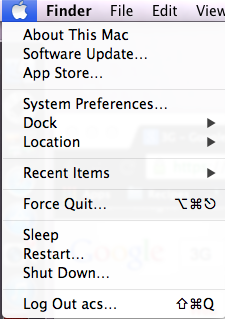
1. Go to your Apple (top left) then click on System Preferences


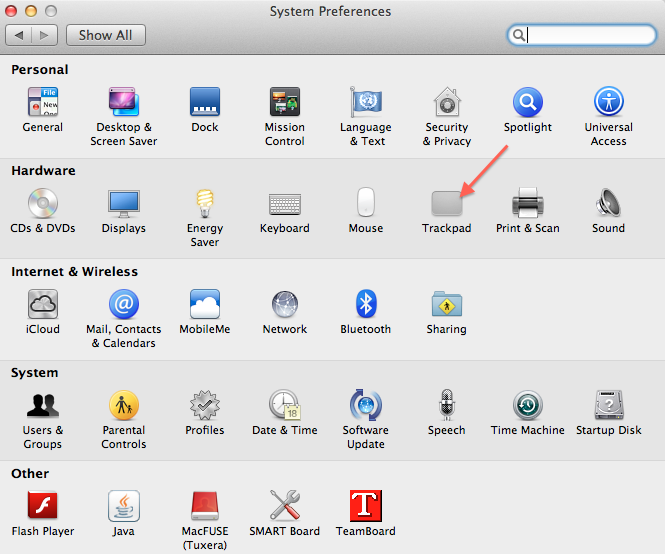
2. Click on Trackpad

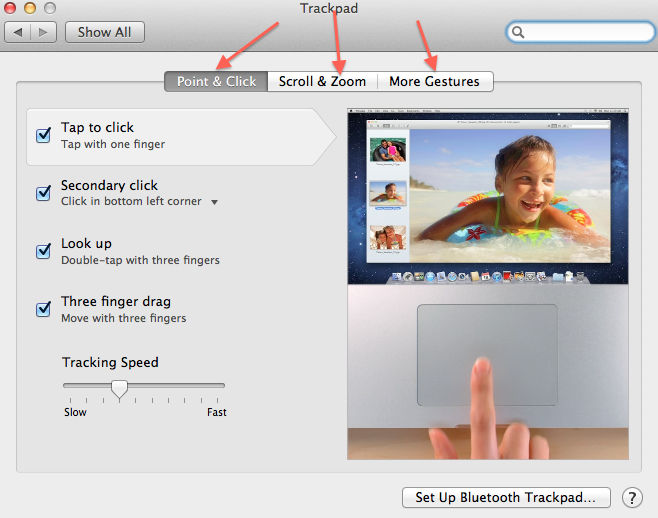
3. Three Different Tabs - Point & Click, Scroll & Zoom, More Gesture -- 
Customize your settings

More detail information regarding your trackpad settings can be found on the Apple support page (link below).

http://support.apple.com/kb/HT4721


By: Jessica Fincel @jfincel32
Wednesday, September 25, 2013

Vocab Ideas

Learning vocabulary is always a challenge. I struggled learning vocabulary as a student.  These tools would of been great for me.  Here are some tech tools that can be used by students and/or teachers.  Check them out!! Great resources!!

Student Friendly Vocab Sites
Google Search Operator -- Define:then the word
IE: define:dendrites


Vocab Games/Study Resources  -  Quizlet and StudyBlue  

Quizlet


Quizlet Tutorials


StudyBlue
http://www.studyblue.com/


StudyBlue Resources and Tutorials


Classroom Assessment and Collaborative Tools
Google Forms  -- Easy option
Infuse Learning


Infuse Learning
~Great clicker system ~ Works on any device ~Just need internet

http://www.infuselearning.com/

By: Jessica Fincel @jfincel32


Sunday, August 18, 2013

Summer of 2013 Favorite Tips and Tools

It is official, school has started for ACSD, and a GREAT start to the school year (13-14). Summer is OVER =-(. Good news, summer tech for ACSD staff went very well. GREAT JOB ACSD.

Jessica's Top 5 FUN Tech Tips and Tools

PIN, PIN, PIN, PIN
Pin your favorite and/or most used tabs in firefox or chrome
http://www.techrepublic.com/blog/tech-sanity-check/how-to-use-pin-tab-to-organize-your-work-in-google-chrome/

https://sites.google.com/a/atlanticiaschools.org/sw-google-summit---glenwood/google-chrome-chrome-101/tabs

DOCTOPUS AND GOOBRIC
Grade with a rubric in Google Docs
https://sites.google.com/a/ghaea.org/southwest-iowa-summit/doctopus-goobric

CHROME SYNC
Google Chrome sync is a powerful tool. Love having multiple users!!
https://sites.google.com/a/atlanticiaschools.org/sw-google-summit---glenwood/google-chrome-chrome-101/chrome-sync

FILTERS - GMAIL
Filter emails in gmail
http://www.googlegooru.com/how-to-create-a-gmail-filter/

RUBRICS AND MORE RUBRICS
Great way to create personalized rubrics
http://rubistar.4teachers.org/

Enjoy these tips.

Tips an Tricks Sources - @jasonhiner @JudyGriffinAEA @thegooglegooru

By: Jessica Fincel @jfincel32