Search This Blog

Showing posts with label Khan. Show all posts

Thursday, March 30, 2017

ACSD March Madness


March Madness is HERE! The final four is this weekend. Many of you would STRONGLY AGREE, we have March Madness Champs right here at ACSD. With the leadership from Mary Beth, she arranged a way to showcase ACSD central office personnel, building secretaries, the tech team, and the food service director at the Iowa Association of School Business Officials Conference this week. These group of professionals has done AMAZING things behind the scenes. They deserve the recognization as leaders and innovators in the state of Iowa. Please give them a high-five for a job well done.  


Don't MISS out!!

Google Expeditions coming VERY soon. We will have a Google Expedition Kit ready to go by Monday, April 3rd. At Washington and Schuler the majority of general ed classes will be exposed to Google Expeditions during library skills. Janice deserves special thanks for taking and using library skills to provide ACSD students a chance to explore places they only envision in their dreams. WOW! THANK YOU, JANICE. AMS and AHS educators, please contact a TLC member, Ginger, Janice, or a Tech Member to arrange a time to take advantage of this opportunity.

Below is a Google Sheet with a list of tours.

What is Google Expeditions you may ask?
Definition: Google Expeditions enable teachers to bring students on virtual trips to places like museums, underwater, and outer space. Expeditions are collections of linked virtual reality (VR) content and supporting materials that can be used alongside existing curriculum.


Pixar in Box - You Say what?  -- Khan Academy

Definition: Pixar in a Box is a behind-the-scenes look at how Pixar artists do their jobs. You will be able to animate bouncing balls, build a swarm of robots, and make virtual fireworks explode. The subjects you learn in school — math, science, computer science, and humanities — are used every day to create amazing movies at Pixar. This collaboration between Pixar Animation Studios and Khan Academy is sponsored by Disney.

Check it out by clicking HERE.


Mark you Calendar
Last Sumdog Challenge for the 2017-2018 School Year


#ACSDTECH
By: Jessica Fincel


Tuesday, March 17, 2015

Happy Saint Patrick's Day -- Lucky Tips

Happy Saint Patrick's Day!!!


I am sticking with my Holiday themes this year as it reminds me to create and post to the tech blog.  My goal is to post once a month in the hopes all of you read it :)  So, here it is....


The following two websites demonstrate progress.  I received an email from an administrator and a teacher to make sure I tell teachers about them.  I think that is just AWESOME.  It goes back to one of my favorite sayings... “The best resource is each other” so THANK YOU to the people who brought these sites to my attention.


GetKahoot
A great website to create a quiz, survey, and discussion. A game-based classroom response system.
Teacher Side: https://getkahoot.com/
Student Side: https://kahoot.it/
Step 1 Create a Quiz Video


Khan, Khan, Khan
Do  I  really need to to say more... Khan is endless.

I  also had the privilege to witness 6 sections of math this month set up with Khan Academy.  Thank you Mr. Baier.  


Resources:

Also, do you know Khan and Bank of America are trying to help students and adults be better with their money? This is a great tool to understanding Financial Literacy. It is free curriculum at your finger tips.


The next website should not be a new one to you, but we have a unique and great opportunity until March 31st.  SUMDOG is temporarily open for both Reading and Writing and advanced Reporting for all subjects until March 31st. Check it out.


SUMDOG
Math (K)-8, Reading (Gr 1-5), and Writing (3-8)


Reminder:  All the students are set up and ready to go.


Friendly Apple Tip....
Having troubles with scrolling!!  
Tip 1: Two Finger Scrolling (Up and Down)
Tip 2: Change and Play with Track Pad Settings
Instructions: Go to Apple, System Preferences, and Trackpad
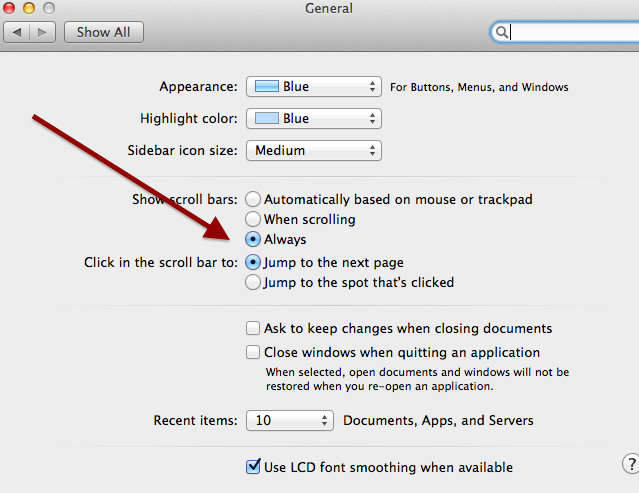
Tip 3: Turn your Scrolling on all the time
Instructions: Go to Apple, System Preferences, General and in the Show Scroll bars, Select--Always
Screen Shot 2015-03-17 at 10.58.01 AM.png


By: Jessica Fincel