Search This Blog

Tuesday, May 19, 2015

14-15 Reflection -- WOW!!


Well it is official!! This reflection is now an annual tradition.   After receiving very positive responses from the 2013-14 reflection,  we thought we should keep a good thing going.  The ACSD tech team wants to once again say GREAT JOB!!!  As we stop and reflect on the past year, we are amazed at all the things we have seen in various classrooms and in the district as a whole.  #ACSDTECH  Keep up the good work!!


Here are great examples of technology and learning that have been done this school year:
  • Rolled Out 1 to 1 at AHS
  • Successful Apple PD for AHS Staff
  • Creative Glogsters created
  • Online JMC - Standard Based Report Cards for Washington (Successful Trial)
  • Google Classrooms used by many throughout the district
  • Digital Citizenship taught through IBooks
  • Launched Online textbooks for Math and Science (AHS)
  • Sumdog, Sumdog, and More Sumdog
  • Augmented Reality  -- Aurasma App
  • OSMO was here and Back Again
  • Scratch program used in STEM classes
  • We now have 104 Members on “ACSDTWEEPS” Twitter Use -- Thanks AB
  • Integrated new apps “Letter for School”, “Raz Kids” and many more
  • Online P/T Conferences (AHS, Schuler, & Wash)
  • Word Clouds created with Wordle
  • Lego building online
  • AIW Lessons VIdeotaped and Uploaded to Google Drive/Youtube
  • Poetry Videos created on  WeVideo
  • News Articles posted on Fodey
  • Student created animated videos with Moovly
  • Flippity use for Test Review
  • Real Life technology used at AHS Career Day
  • Moby Max, More.Starfall, and Facts 4 Me
  • AHS Students updating RAM for Staff Computers
  • Saving Interactive Whiteboard Math problems on the IWB and sharing it with absent students
  • Flubaroo used at FFA Contest
  • Successful online testing -- NWEA and IEOC
  • Great uses of Interactive Whiteboard
  • Awesome Webfolios created
  • Teachers with an online presence (Blog or website)
  • 2nd Grade Team finding great uses for their Chromebook Cart
  • BrainPop Jr and BrainPop
  • Google Apps used all over the place! =-)
  • Implementation of Khan Academy for many new users
  • Summer School TenMarks Initiative
  • Mr. Northwick, Mr. Yates, and Mrs. Dickerson Presidential Campaign (iMovie)
  • Great back channels with websites such as: Today's Meet, Padlet, and Twitter
  • Google Hangout with Yemen Students
  • Eye of the Needle Episodes
  • Faculty loving their Point 2 Views
  • Iowa Area Online
  • Various videos uploaded to Youtube and Google Drive
  • Symbaloos used for all buildings
  • Online Assessments with Kahoot
  • Students working on their writing skills through Kidblog and other Blogging tools
  • Administrators modeling technology use through Google Forms, Google Docs, Google Calendar, Camtasia, Google Sites, Appointment Slots, and much more
  • QR Codes posted throughout the district
.......................................and the list is never ending....................................


WHAT AN AMAZING JOB YOU HAVE ALL DONE!!!  


KEEP IT UP...
IT WON’T BE LONG BEFORE THE NEXT SCHOOL YEAR BEGINS!


“The education of a man is never completed until he dies.”
― Robert E. Lee


“We now accept the fact that learning is a lifelong process of keeping abreast of change. And the most pressing task is to teach people how to learn.”
―Peter Drucker

Come join the learning this summer.
2015 Summer Professional Development

THANKS -- TECH TEAM

Tuesday, April 7, 2015

No More 3 Ring Binder -- Online Portfolio

Are you in the following scenario??....It is April...Your teaching artifacts are due and you need to create a professional portfolio for your administrator....You wish there was an easier way than printing all your documents out, hole punching each one, organizing them, and then placing them into a three ring binder. Well, there is!  Now is the time to set up an Online Portfolio.  I  have an easy template that you can use. All you need to do is add your own content.  


All you need to do is add your own content...

Objective 1: Create a Google Site from a Template
Step 1: Log into your Google Account
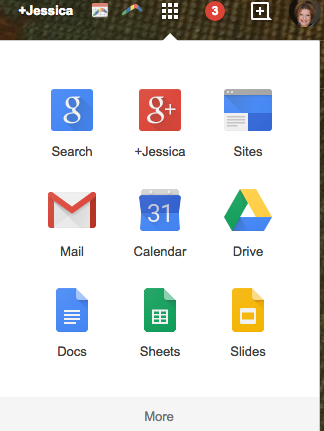
Step 2: Go to  Google Sites (You will find it under your Grid drop down in your Email - See Screen shot below.)
Screen Shot 2015-03-30 at 10.58.03 AM.png

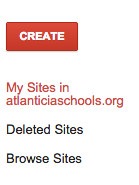
Step 3: Click “Create.”
Screen Shot 2015-03-30 at 10.51.51 AM.png

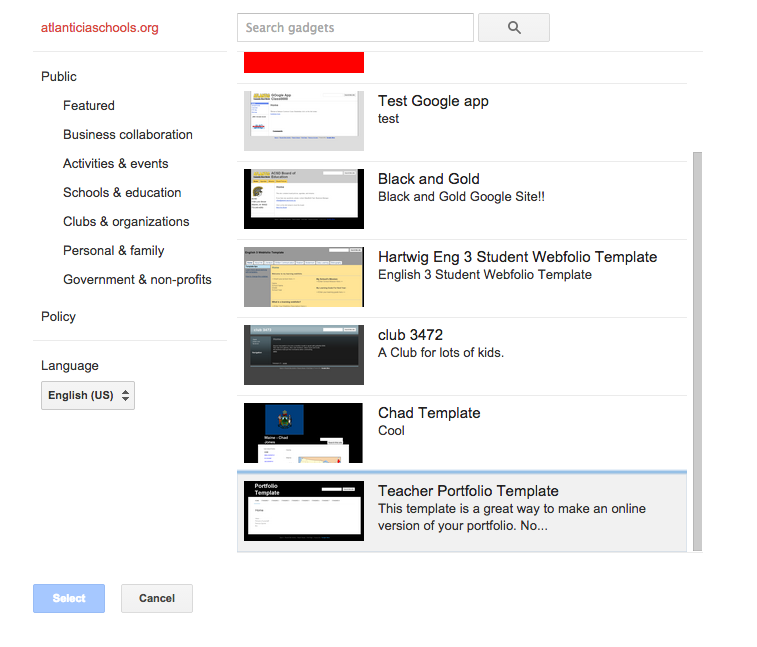
Step 4: Click on “Browse the gallery for more” (I know I always say “avoid templates”, but I promise you this one is a good one and easy to use).
Screen Shot 2015-03-30 at 10.53.02 AM.png
Step 5: Click the “Teacher Portfolio Template” and then click Select. (Or you may click on HERE and use this template -- especially outside ACSD domain.)
Screen Shot 2015-03-30 at 10.53.39 AM.png


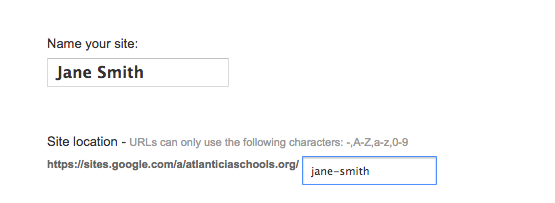
Step 6: Name your site.
Screen Shot 2015-03-30 at 10.56.12 AM.png

Step 7: Click “Create.” (It is on the top of the page.)


Objective 2: Get your Content Organized on your Computer

Now it’s time to find all YOUR AWESOME content.  Get it organized and ready to upload to your website.

Click HERE to watch a quick tutorial on how to save files to pdf and organized them on your computer.

Other tips: Screen Shot of your content

Objective 3: Content, Content, and More Content

Standards 1 - 8 are File Cabinet Web Pages
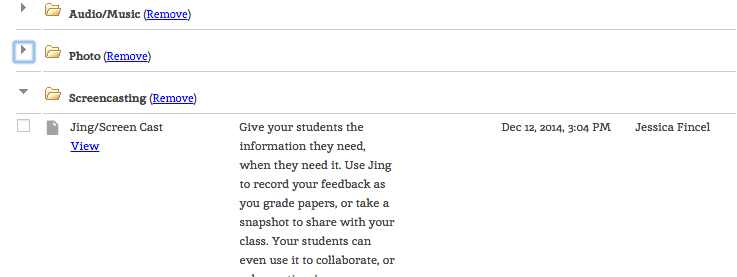
What is a File Cabinet Page?
A file cabinet page is designed to store and organize files from your computer, web (link), and/or Google Drive.  
Screen Shot 2015-03-30 at 11.08.22 AM.png

You may also organize the files into different folders on your site.  


Screen Shot 2015-03-30 at 11.09.56 AM.png

Click HERE to watch a quick tutorial on how to update your file cabinet page.


Objective 4: Update the Home Page
Click the Pencil Icon and update the home page.

Suggestions:
Bio
Picture
Family Picture
Favorite Quote
Why you love teaching
Personalize this page

Objective 5: Share the Site
Screen Shot 2015-03-30 at 12.55.28 PM.pngSTOP AND THINK BEFORE SHARE...
Some of your content that you put on this document is Sensitive Data... So only share this site to people that you want to see it.  IE: Administrators
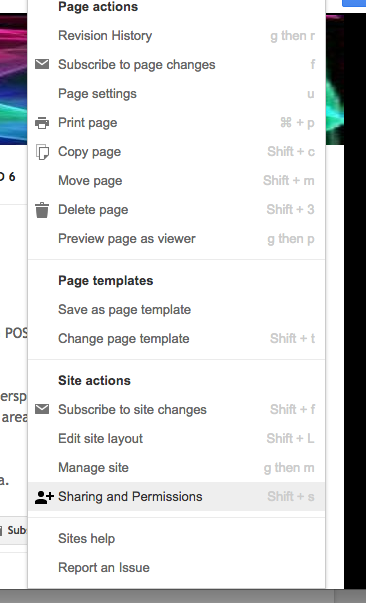
Step 1: Click on the Gear
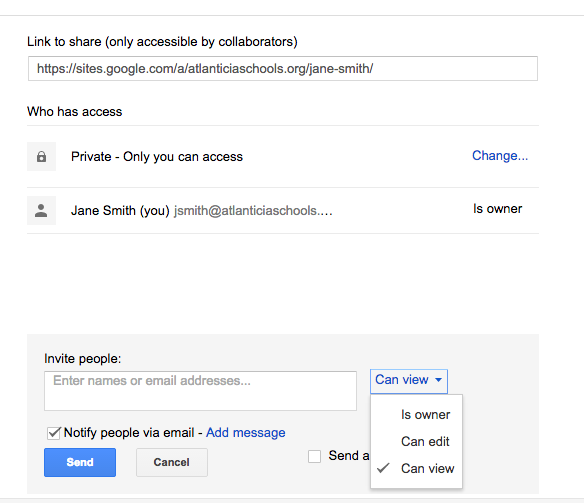
Step 2: Click on the Sharing and Permissions


Step 3: Share to the appropriate personnel (I suggest you use VIEW ONLY).
Screen Shot 2015-03-30 at 12.57.31 PM.png

Objective 6: Personalize your site
Idea 1:  Change the Header
Idea 2: Change the Theme
Idea 3: Customize the Fonts and text
Idea 4: Add more pages....
Idea 5: This is your site... do what you want with it.  
Happy Creating!!

Google Site Resources:
By: Jessica Fincel

Tuesday, March 17, 2015

Happy Saint Patrick's Day -- Lucky Tips

Happy Saint Patrick's Day!!!


I am sticking with my Holiday themes this year as it reminds me to create and post to the tech blog.  My goal is to post once a month in the hopes all of you read it :)  So, here it is....


The following two websites demonstrate progress.  I received an email from an administrator and a teacher to make sure I tell teachers about them.  I think that is just AWESOME.  It goes back to one of my favorite sayings... “The best resource is each other” so THANK YOU to the people who brought these sites to my attention.


GetKahoot
A great website to create a quiz, survey, and discussion. A game-based classroom response system.
Teacher Side: https://getkahoot.com/
Student Side: https://kahoot.it/
Step 1 Create a Quiz Video


Khan, Khan, Khan
Do  I  really need to to say more... Khan is endless.

I  also had the privilege to witness 6 sections of math this month set up with Khan Academy.  Thank you Mr. Baier.  


Resources:

Also, do you know Khan and Bank of America are trying to help students and adults be better with their money? This is a great tool to understanding Financial Literacy. It is free curriculum at your finger tips.


The next website should not be a new one to you, but we have a unique and great opportunity until March 31st.  SUMDOG is temporarily open for both Reading and Writing and advanced Reporting for all subjects until March 31st. Check it out.


SUMDOG
Math (K)-8, Reading (Gr 1-5), and Writing (3-8)


Reminder:  All the students are set up and ready to go.


Friendly Apple Tip....
Having troubles with scrolling!!  
Tip 1: Two Finger Scrolling (Up and Down)
Tip 2: Change and Play with Track Pad Settings
Instructions: Go to Apple, System Preferences, and Trackpad
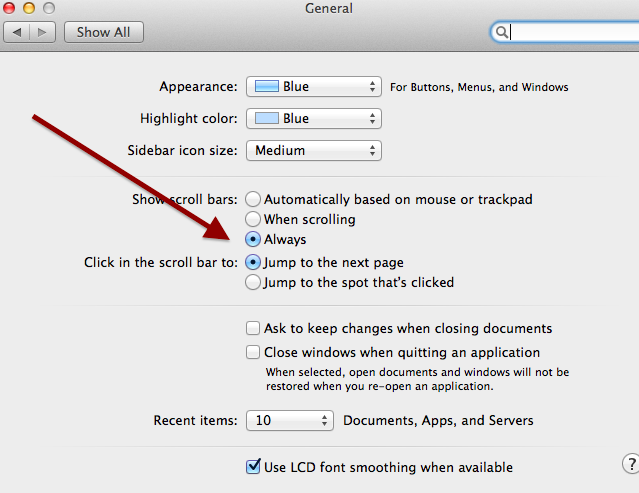
Tip 3: Turn your Scrolling on all the time
Instructions: Go to Apple, System Preferences, General and in the Show Scroll bars, Select--Always
Screen Shot 2015-03-17 at 10.58.01 AM.png


By: Jessica Fincel

Wednesday, February 25, 2015

Bag of Tricks.....

Recently, I have had the opportunity to learn many NEW things.  I have been challenged by many of you.  In doing so, I have come across many things that I have not played with for a while like “Google Templates” or new tools like “Youtube for Kids”.  So, now I want to share my “Bag of Tricks” with you.


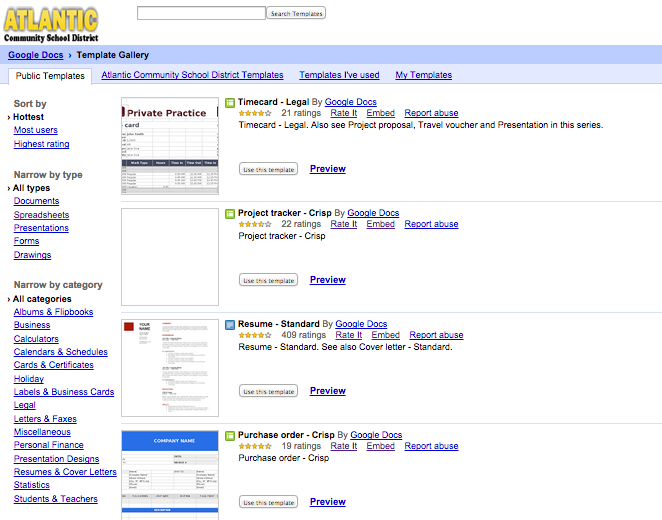
Google Templates
You can use Google’s template gallery to create documents, spreadsheets, presentations, or forms. You can use it for just about anything so there is no need to reinvent the wheel.  


YouTube App for Kids
Google has released a new YouTube app.  It is kid friendly and safe for young and creative minds.


Set up your Default Email Client in Chrome and Firefox
Question/Comment to the Tech Dept:  I wish when I clicked on an email on a webpage it WOULDN’T open my Entourage or Mail applications. Why won’t it open my gmail in my DEFAULT browser?  


Tech Dept Answer:  Follow the instructions below for both Chrome and Firefox!


Google Science Fair
From now through May 18, students around the world ages 13-18 can have their chance to change the world.
Google Science Fair


Google for Education
Want to know more about Google App Products and more Google Educational Resources?  
Get Trained for Free from Google... step by step instructions!!


What more free resources by Google?  Click below to find resources such as Google Search Education, Google Cultural Institution, CS and Stem, Google Maps and much more.


Last but not least or maybe it’s my favorite...


Don’t forget the updated 

CHECK IT OUT... Google Classroom, Math, Science/Stem, History, Blogging, Literacy, Writing, and Much Much More  


By: Jessica Fincel

Tuesday, January 13, 2015

Sumdog Challenge -- Wash, Schuler & AMS

SUMDOG CHALLENGE!!


ACSD Tech Team is piggybacking the idea from Green Hills Sumdog Challenge that begins January 23rd.  ACSD Sumdog Challenge starts tomorrow, January 13th.  


Need some fun ways to boost your students' math skills?  Check out the Google Doc below (per building)!!  
Are you up for the Sumdog Challenge?


What is Sumdog?
Sumdog is free educational games to motivate your students to practice math!!


Do you know???
Do you know your fellow co-worker Jessica Larsen uses this website?  
Do you know it is for ages K-8?
Do you know ALL the student accts are ready to go?
Do you know kids don't even realize they are doing math problems? 
Did you know that Tech Dept will be more than happy to help you, meet with you at team meetings or individually?
Do you know all you need to do to sign up for Sumdog is complete this FORM and read the document above?

Symbaloo Pages

So.......

By: Jessica Fincel