Search This Blog

Friday, January 22, 2016

ABC Mouse..... Free for Educators

Screen Shot 2016-01-13 at 11.49.19 AM.pngI always go back to my favorite saying, “the best resource is each of you.” There are two special (JK) teachers (not to name names) that challenged me to learn more about an opportunity for educators. They directed me to find out more about ABC mouse. It is designed for lower elementary students (ages 2-7). 
ABC Mouse is a full online curriculum resource. -- And did I forget to mention?  IT IS FREE!! You will find the following document in your Wash Tech Training Folder; however, the detailed instructions and tutorials are listed below.


You will have to sign up individually on the link below.

FAQ

(Special Note: These Youtube videos permissions are set only for inside the ACSD District).
How do I register and add students?


How do you Create a Class and Add Students to my Class?

How do I use ABC Mouse on the Computer Labs?
Complete a tech Request and Accept Invite  **MUST WATCH** (2 Min 12 sec)


How do I have my students use ABC Mouse at home?
How Students Set up use at Home  **MUST WATCH** (1 Min Sec 56)


How do I set up my IOS Device and My Computers in my Classroom?


What are some tips and Tricks?

Thursday, January 21, 2016

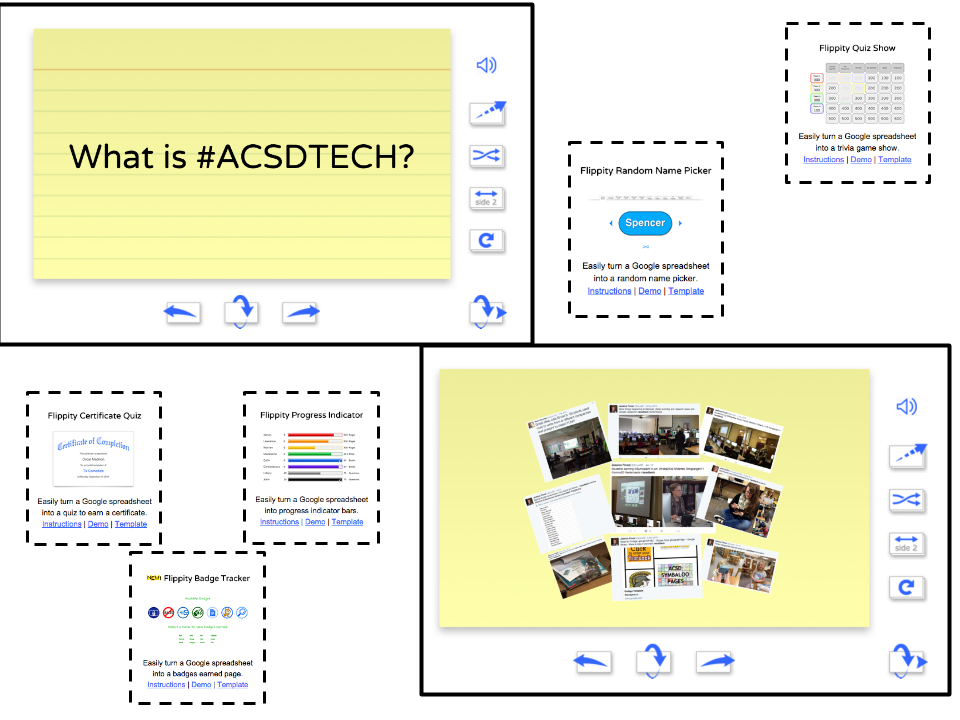
Flippity Floppity Boo --- I mean Flippity.net...

As we are now in the heart of 3rd Quarter, there are many reviews and assessments taking place or about to take place.  You might be wanting a new type of exit ticket or a creative way to formatively assess your students. I might have just the thing you need...keep reading!   
Flippity...I love it!!  Easy to use, it’s free, and it works with Google Docs...
There are many Schuler teachers (but it’s great for all levels) that use this program... ask them what they think.  Get a jump start and use it for your 3rd and 4th Quarter Study guides in your Google Drive.  The best part about this website is they keep adding more tools: Quiz Certificate, Badge Tracker, Progress Indicator, Random Picker, Quiz Show (like Jeopardy).  

Flippity Flashcards.png


Here’s a few more of my favorites!


GoFormative - GoFormative runs on any internet connected device and is optimized for any 1:1, flipped, or blended classroom.  This is a great replacement of the website Infused Learning. (November 2015 Blog) - Great Find Katie =-)

A great website to create a quiz, survey, or discussion. It’s a game-based classroom response system. (March 2015 Blog)

There are many tools posted on the #acsdtech Website. Click HERE to go directly to the Formative Assessment Webpage.   
--------------------------------------------------------------------------------------------------------------
Special Announcements...
  • Great Job Washington and Schuler on the Sumdog Snowflake Math Showdown Challenge. 
  • Thank you to the following for taking the time to saving the #acsdtech website from the Grinch. Thank you.... (December 2015 Blog) They received a small token of my appreciation....... Matt A., Ginger B., Brielle C.,  MaryBeth  F.,  Jennifer G., June H ., Tonna H., Terry H., Meryl H., Paulette H., Paul I., Cathy K., Cathy L., Jessica L., Amber M., Jennifer R., Amy R., Taylor W., & Tony W.

Below is the ANSWER to what is #ACSDTECH.... 

KEEP UP THE GOOD WORK!!!


#ACSDTECH

By: Jessica Fincel


Tuesday, December 22, 2015

Don't be a Grinch! Help me stop the Grinch!!

During this time year it can be a challenge NOT to be a Grinch. Believe me, I know...
So, here is a little Christmas cheer.  Please stop the Grinch from stealing Christmas or, in this case, from stealing the ACSDTECH website.

As I stop and reflect on the tech changes from last year, I recall working hard updating the ACSDTECH website last December. Unfortunately this December, time did not allow me to do so as my family has been my top priority. I did, however, keep my New Year’s Resolutions from last year.   

My resolutions last year were to post once a month on ACSDBLOG  (during the school year), and to do a better job updating the ACSDTECH website throughout the year. I wanted to send a friendly reminder that both the ACSDBLOG and ACSDTECH website are valuable resources. Enjoy the following activity!

This activity is in the hopes that you navigate through the  #ACSDTECH WEBSITE and see what it has to offer. Don’t be a Grinch!

Activity:
The Grinch is hiding 6 times throughout the website.  Can you find him?  Click on the form below to complete the activity.   


Here are the top posts from the last year. Check them out again or for the first time!

November Technology Blessings - ACSD Symbaloo, Google Photos, Plickers, TLC Tools, and Zooburst


Parents NOW can view assignments from Google Classroom, OSMO HERE, and Lunch with Tech..what more could you ask for?


Time, Time, Time.....and Need More Time


No More 3 Ring Binder -- Online Portfolio


#ACSDTECH
#HAPPYHOLIDAYS

By: Jessica Fincel

Sunday, November 29, 2015

"November Technology Blessings" - ACSD Symbaloo, Google Photos, Plickers, TLC Tools, and Zooburst

The month of November has been filled with many "technology blessings".


SYMBALOO
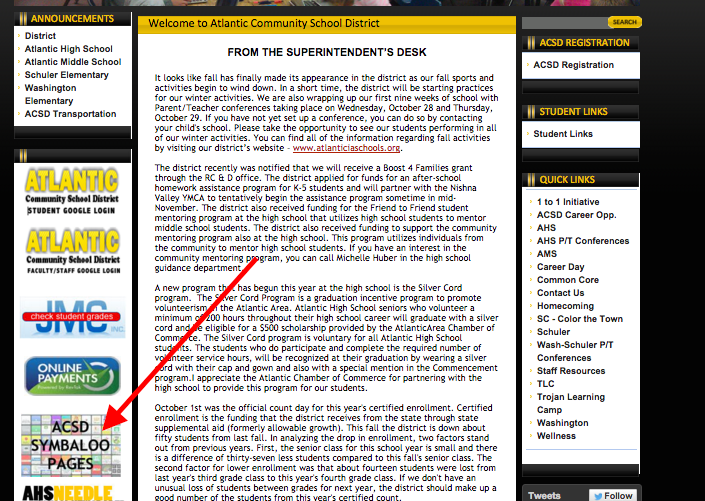
There is a new shortcut for the Symbaloo Pages on the ACSD District Website (see image below).  
Students and Parents NOW have quick access from home.

Screen Shot 2015-11-02 at 3.01.51 PM.png


GOOGLE PHOTOS

Do you need a great place to store your most prized possessions?  Google Photos is a great way “Backup” or Edit Google Photos.


PLICKERS
You may vaguely remember the Plicker activity during August’s inservice.  Do you remember waving a piece a paper in the air??  Yup - that is a Plicker card! It’s a fun way for students to respond with no student device needed.  

Image Source: www.plickers.com
Plickers is a powerful simple tool that lets teachers collect real-time formative assessment data.

Each media center now has a set of 40 laminated Plicker Cards available to check out. You may also create your own set, but this is a great way to get started and test it out without all the mess.  

TLC Lead team has shared some really good tools that I would love to share.
Check out Zaption and GoFormative.
  • Zaption ~Turns online videos into interactive learning experiences that engage students and deepen understanding.
  • GoFormative - GoFormative runs on any internet connected device and is optimized for any 1:1, flipped, or blended classroom.  This is a great replacement of the website Infused Learning.

Special Announcement -- Zooburst is back with 30 licenses until August 2016.  Take advantage of this opportunity!

ZooBurst is a digital storytelling tool that lets anyone easily create his or her own 3D pop-up books. Using ZooBurst, storytellers of any age can create their own rich worlds in which their stories can come to life.

Click HERE to view a Zooburst sample by a 2nd Grade student.

By: Jessica Fincel
@jfincel32


Tuesday, October 27, 2015

Parents NOW can View Assignments from Google Classroom, OSMO HERE, and Lunch with Tech..what more could you ask for?

Google Classroom
It is now possible for parents to view assignments that are posted in Google Classroom. How you want to know?  Share your Google Classroom Calendar - Public and Post on your website.


Click Here for Instructions


OSMO is HERE!!!
What is OSMO??


Screen Shot 2015-10-26 at 9.40.46 PM.png


Samples of Masterpiece
Trojan Head by Heather
Girl Power by Heather


  • Each building has an IPAD and OSMO to check out in your building Media Center.
  • Click HERE for details


“Lunch with Tech” -- All staff are welcomed!
Bring your own lunch to the media center.  Stop by during the dates and times listed below.  We will begin a quick demo at the beginning of each time slot.   It is  a great opportunity to receive “yummy” dessert and tech tips.  “Lunch with Tech” will be quick demos on some of the new tools that have been sent out lately. Come join the fun.  


November 5th @ Schuler Media Center
Time Slot 1: 11:40AM - 12:00PM
Time Slot 2: 12:10PM - 12:30PM

November 9th @ Schuler Media Center
Time Slot 1: 11:40AM - 12:00PM
Time Slot 2: 12:10PM - 12:30PM

November 10 @ Washington Media Center
Time Slot 1 - 11:35AM - 11:55AM
Time Slot 2: 12:00PM - 12:20PM
Time Slot 3: 12:25PM - 12:45PM

November 16 @ AHS ICN Room
11:24AM - 12:45PM
Time Slot 1: A Lunch
Time Slot 2: B Lunch

November 17 @ Washington Media Center
Time Slot 1 - 11:35AM - 11:55AM
Time Slot 2: 12:00PM - 12:20PM
Time Slot 3: 12:25PM - 12:45PM


Next time you see a Washington Staff member give them a HIGH FIVE!!l


Check out their great pumpkin decorating skills!  They also deserve kudos for launching Standard Based Report Cards this quarter in JMC. JOB WELL DONE!!  Thanks!!


More than ever you want more time…
Check out the last post for Time Saving Tips.


Question of the Month?
One Space or Two spaces after a Period...
Answer: One Space

By: Jessica Fincel


Wednesday, September 30, 2015

Time, Time, Time.....and Need More Time

Below are some TIME SAVING tips and tricks.  These tips and tricks will save you time.  In today’s society, having time to do the things you want or need to do is hard to come by.  


Time Saver 1
Q1: Do you need or want to convert a pdf to an editable document and don't have TIME to type it?
A1: Yes! Google Docs can convert a pdf to an editable document.
Ask DeeAnn if this saved her tons of time.


Time Saver 2
Q2: Do you want to manage TIME in the classroom more efficiently? Do you want to students stay on task?
A2: Yes and Yes! Using Google Classroom and the Google Classroom Extension will do just that!


Check Out Alice Keeler’s Blog Post on Google Classroom Share Extension.


If you are using Google Classroom.... you WANT and NEED to USE this.


Note: The tech office has “Pushed Out” the Google Classroom Share Extension for EVERYONE!  You will need to have your students logging into their chrome vs gmail. See Time Saver 5 for details.


Time Saver 3
Q3: Do you need TIME to write a paper and don't have the typing skills to get it done fast?
A3: Yes! Google Doc has a new feature called Voice Typing. (Speech to Text)


Time Saver 4
Q4: Do you have a document, spreadsheet, and/or presentation due and don't have the TIME to start from scratch?
A4: Yes! Check out Google Docs, Sheets, and Slides and their New Templates they have to offer.
Document: docs.google.com
Spreadsheet: sheets.google.com
Presentation: slides.google.com


Time Saver 5
Q5: Do you wish you can save TIME logging students into their Google Apps Account?
A5: Yes! Having your students log into Chrome instead of Gmail does just that. It keeps them organized and they have the feel their own "personal" browser. It is like logging into a Chromebook.
Instructions below.


****Challenge -- Please post your favorite time saver you plan or have used.****


A small token of my appreciation will be given when you make a post on the link above.

By: Jessica Fincel